COMPARE
Element Editor vs Terra Draw
Different shapes of library. Terra Draw centralises drawing logic across many map engines with no built-in UI. Element is a React drop-in with a full editor, a data layer, and adapters for Leaflet and MapLibre.
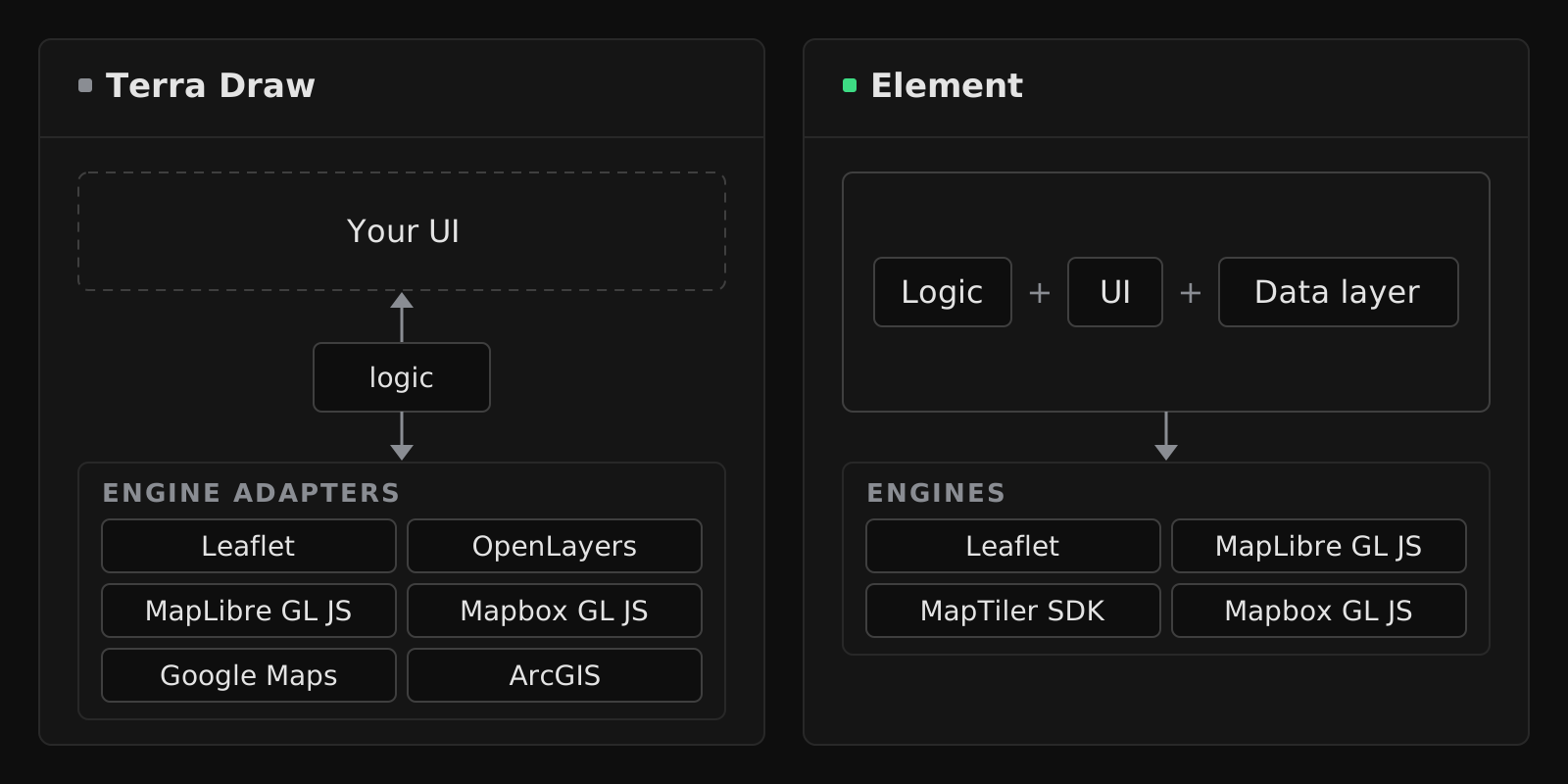
Different products, some overlap
Terra Draw is a logic library. It handles the drawing state machine across Leaflet, OpenLayers, MapLibre, Google Maps, Mapbox GL and ArcGIS. You bring the UI — the toolbar, the property editor, the data pane. Terra Draw's value is cross-engine consistency and extensibility via custom modes.
Element is an editor. The drawing logic, the toolbar, the vertex handles, the data table, the schema editor, the GeoJSON editor — everything visible in a map editor — ships in the package. Element supports Leaflet, MapLibre GL JS, MapTiler SDK and Mapbox GL JS, and prioritises React as a first-class target.
Pick Terra Draw if you're composing your own editor UI, or need OpenLayers, Google Maps or ArcGIS support. Pick Element if you want a drop-in that works end-to-end.
Feature comparison
| Capability | Terra Draw | Element |
|---|---|---|
| Engines supported | Leaflet, OpenLayers, MapLibre GL JS, Mapbox GL JS, Google Maps, ArcGIS | Leaflet, MapLibre GL JS, MapTiler SDK, Mapbox GL JS |
| Built-in UI | Not included | Includedtoolbar, panels, modals, editor |
| React component | Not included | Included@element-editor/react drop-in |
| TypeScript, first-class | Included | Included |
| Drawing modes | Point, marker, line, polyline, polygon, rectangle, angled rectangle, circle, ellipse, sector, sensor, freehand, freehand line | Point, line, polygon, rectangle, circle, freehand, road-snapped route, OSM picker |
| Custom modes / extensibility | Includedcustom modes and adapters | Composable UI components, no custom modes |
| Geodesic line drawing | Included | Not included |
| Vertex editing | Included | Included |
| Snapping | Included | Included |
| Boolean operations (union, intersect, subtract, exclude, cut hole, slice) | Not included | Included |
| Geometry processing (buffer, simplify, smooth, break apart, merge) | Not included | Included |
| Transform (scale, rotate) | Includedin select mode | Included |
| Measure | Not included | Included |
| Geometry validation (self-intersection, area limits) | Included | Not included |
| Schema-backed properties (7 typed field types) | Not included | Included |
| In-app schema editor | Not included | Included |
| Data table with inline editing | Not included | Included |
| Two-way GeoJSON editor | Not included | Included |
| Keyboard shortcuts | Includedconfigurable finish, cancel and edit keys | Includedevery tool and panel, remappable |
| Licence | MIT | MIT |
What Terra Draw has that Element doesn't
Wider engine coverage. Terra Draw's adapters include OpenLayers, the Google Maps JavaScript API, and the ArcGIS Maps SDK for JavaScript — engines Element doesn't support today. If your stack requires any of those, Terra Draw is the honest answer.
Geodesic line drawing. Terra Draw's line mode can draw along great-circle paths, useful for aviation or long-distance routing. Element's route tool snaps to road networks via an external routing API, which covers a different need.
"Bring your own modes" philosophy. Terra Draw exposes a custom-mode API where you register your own drawing state machine. Powerful for unusual interaction patterns (constrained drawing, shape templates, domain-specific behaviours). Element's extensibility model is different — recombine UI components from @element-editor/ui — which is simpler for most use cases but less flexible at the state-machine level.
Geometry validation. Every Terra Draw mode takes a validation function, and built-in validators reject self-intersecting shapes or polygons outside an area range while the user draws. Element validates feature properties against your schema; it doesn't check polygon edges for self-intersection.
What Element has that Terra Draw doesn't
A React component. @element-editor/react is a drop-in — owns the map, the toolbar, all editor state. Terra Draw users building React apps have to write their own wrappers and toolbar.
Complete editor UI. Toolbar, selection outlines, transform controls, property panels, modals. Terra Draw renders the shapes and handles on the map but ships no toolbar or panels; you build them or use a community plugin.
Boolean ops, geometry processing, measure. Terra Draw focuses on drawing and editing shapes; Element adds union, subtract, buffer, simplify, measure and more on top.
A data layer. Typed schemas with validated fields, an in-app schema editor, a data table with inline editing, and a two-way GeoJSON editor. Categorically new ground relative to Terra Draw.
Show it in code
Terra Draw (with the Leaflet adapter, as an example):
import { TerraDraw } from 'terra-draw'
import { TerraDrawLeafletAdapter } from 'terra-draw-leaflet-adapter'
import { TerraDrawPolygonMode, TerraDrawPointMode } from 'terra-draw'

const draw = new TerraDraw({
  adapter: new TerraDrawLeafletAdapter({ map, lib: L }),
  modes: [
    new TerraDrawPolygonMode(),
    new TerraDrawPointMode(),
  ],
})
draw.start()
draw.setMode('polygon')

// You build your own toolbar, property editor, etc. around this.Element with @element-editor/react:
import { ElementEditor } from '@element-editor/react'
import '@element-editor/react/style.css'

export default function App() {
  return (
    <div style={{ height: 600 }}>
      <ElementEditor onChange={(data) => console.log(data)} />
    </div>
  )
}The Element version includes the toolbar, the tools, the editing modes, the property forms, the data table, the GeoJSON editor. The Terra Draw version is the drawing layer only.
Frequently asked
Does Element support OpenLayers, Google Maps, or ArcGIS? Not today. If those engines are requirements, Terra Draw is the right fit. Element covers Leaflet and the MapLibre family: MapLibre GL JS, MapTiler SDK and Mapbox GL JS.
Can I use Element's drawing logic without its UI?
Partially. @element-editor/core exposes the stores, the types and GeoJSON helpers (bbox, parsing, schema validation), and @element-editor/ui exposes the worker-backed geometry operations (runGeometryWorkerOperation). The adapters' ElementEditorControls draws and edits on your map without any toolbar or panels, so you can drive it from your own buttons through its ref (setTool, getFeatureCollection, …), but it is a React component that renders its own map layers and handles. If your goal is framework-agnostic drawing logic with no UI at all, Terra Draw is closer to that shape.
Does Terra Draw have a data layer?
No. Features drawn with Terra Draw have the standard GeoJSON properties object — an untyped bag. Its validation checks geometry, not properties. Typed schemas, property forms, and data tables are Element-specific.
Which has more production mileage? Terra Draw has been on npm since 2022, reached 1.0 in January 2025, and has an active open-source community. Element is newer. For stable production today, Terra Draw has the longer track record; for a React-first team with data requirements, Element's feature set is the stronger fit.