FEATURE · GEOMETRY
Clean up the real shapes your users draw.
Buffer, simplify, smooth, break apart, merge. Slider previews compute in a Web Worker so large geometries don't stall the UI.
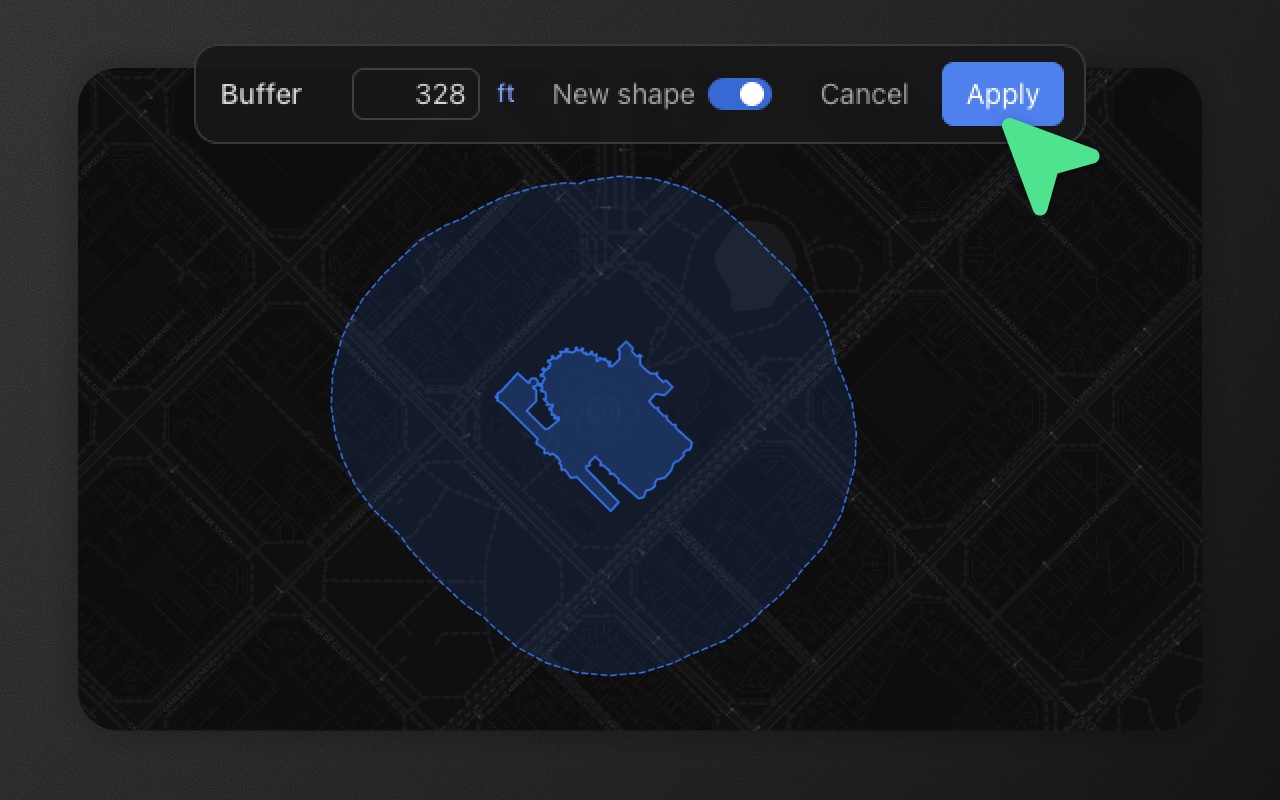
Try it
- 1Click the Survey area, pick Simplify or Smooth, press Enter
- 2Click the Building site, pick Buffer, press Enter
- 3Click a garden, press B to split them
Drawn shapes rarely ship as drawn
A freehand polygon has 2,000 vertices when 30 would do. A polygon imported from a cheap data source is jagged where it should be smooth. A user needs a 200-metre buffer around a utility pole. A multi-polygon needs to become individual features for routing. Two adjacent parcels need to become one for cadastral records.
Every one of these is a one-step problem, and Element Editor has a tool for each. Buffer, simplify and smooth compute their live previews in a background Web Worker, so dragging a slider stays smooth even on complex geometries.
The tools
Buffer
Expand or contract a polygon or line by a fixed distance. Positive buffers grow the shape; negative buffers shrink it (polygons only). Buffering a line produces a polygon (the "pill" shape around the line). The slider runs from −500 m to +2,000 m. By default the result is added as a new shape below the original; switch off New shape to replace the original instead.
The unit system follows config.units.length ('metric' | 'imperial' | 'auto') and the user's settings-panel override. The display unit is auto-picked within the chosen system based on magnitude — metres or kilometres for metric, feet or miles for imperial. Element persists the user override in localStorage under elm_units so it sticks across reloads. Internally everything is metres on the WGS84 spheroid; the unit choice only controls input parsing and display.
Useful for: regulatory setbacks, exclusion zones around hazards, coverage areas, route corridors.
Simplify
Reduce vertex count using the Ramer–Douglas–Peucker algorithm. The tolerance adapts to the shape's bounding box — a tolerance that's aggressive for a city block is gentle for a country outline.
Useful for: compressing freehand output, preparing shapes for low-bandwidth transfer, reducing storage costs.
Smooth
Round and soften a polygon or line by adding interpolated vertices. Configurable from 1 pass (subtle) to 5 passes (very round). Each pass applies a Chaikin-style curve between existing vertices.
Useful for: making machine-drawn shapes look hand-drawn, improving the aesthetic of imported data, preparing shapes for stylised maps.
Break apart (B)
Split a Multi* feature into individual single-geometry features. A MultiPolygon with three parts becomes three Polygon features. A MultiLineString with five segments becomes five LineString features. Each new feature inherits the parent's schemaId and properties.
Useful for: cleaning up imported data that over-uses Multi* types, preparing features for per-feature editing, splitting logical aggregates that shouldn't be aggregates.
Merge
The reverse of break apart — combine 2+ features into a single multi-part feature. Two Polygon features become one MultiPolygon. Three LineString features become one MultiLineString. Mixed types become a GeometryCollection. Shared borders aren't dissolved; use Union for that.
Useful for: consolidating related features, reducing feature count for routing, reversing an over-eager break-apart.
How to use them
Every tool lives in the editing toolbar when a feature (or, for merge, two or more features) is selected. Break apart also has a dedicated keyboard shortcut (B).
Buffer, simplify, and smooth each open a slider panel anchored at the bottom of the map:
- Buffer — distance, in metric or imperial as configured (
config.units.length); the display unit auto-picks metres/kilometres or feet/miles by magnitude. - Simplify — tolerance, scaled relative to the feature's bounding box so the same slider value behaves sensibly on a city block and on a country outline.
- Smooth — passes (1–5). Each pass roughly doubles the vertex count via Chaikin curves.
- Break apart — immediate, no parameters.
- Merge — immediate, requires 2+ features selected.
Preview updates live as you drag the slider. Commit with Enter or the confirm button. Cancel with Esc.
Show it in code
These operations are UI-driven. From code, listen for the commit:
import { ElementEditor } from '@element-editor/react'

export default function App() {
  return (
    <ElementEditor
      onFeatureUpdate={(id, feature) => {
        // fires after a simplify or smooth commit (or a buffer with New shape off)
        console.log('processed', feature.geometry.type)
      }}
      onFeatureAdd={(feature) => {
        // fires for a buffer kept as a new shape, and for each extra part from a break-apart
      }}
      onFeatureDelete={(id) => {
        // fires for the originals replaced by a merge
      }}
    />
  )
}Simplify and smooth replace the original geometry in place (onFeatureUpdate). Buffer adds a new feature (onFeatureAdd) by default, or replaces the original in place with New shape off. Break apart keeps the original feature as the first part (onFeatureUpdate) and fires one onFeatureAdd per other part. Merge fires one onFeatureAdd for the merged result plus one onFeatureDelete per original. Each of these is one undo step.
Where the math runs
Buffer, simplify and smooth use individual Turf packages (@turf/buffer, @turf/simplify, @turf/polygon-smooth) inside the geometry worker (packages/ui/src/workers/geometryWorker.ts), the same worker that handles polygon boolean operations. It's inlined into @element-editor/ui and created on first use, so no bundler setup is needed. Each slider keeps only its latest value, and a computation that takes over 30 seconds is abandoned. Break apart and merge are simple coordinate regrouping and run on the main thread.
Things to know before you ship
- Buffer is geodesic. A 500 m buffer near the equator and a 500 m buffer near the Arctic both produce real 500 m buffers — Element handles the projection internally so you never have to do Mercator arithmetic.
- Simplify is lossy. You can't undo back to the exact pre-simplify vertices via a second "un-simplify" — the coordinate data is replaced. Use ⌘Z (the global undo stack) to restore the pre-simplify state.
- Smooth adds vertices. Each pass roughly doubles the vertex count. Five passes on a 50-vertex polygon produces ~1,600 vertices. Run simplify afterwards if you want smooth-and-lean.
- Mixed merges make a
GeometryCollection. TwoPolygonfeatures merge into oneMultiPolygon, but aPolygonand aLineStringmerge into aGeometryCollection, which buffer, simplify and smooth don't work on. Break it apart to edit the parts again.
Works with
- Boolean operations — combine, then simplify the result.
- Drawing — freehand drawings benefit from a simplify pass after commit.
- Vertex editing — fine-tune after a smooth pass.